Introduction
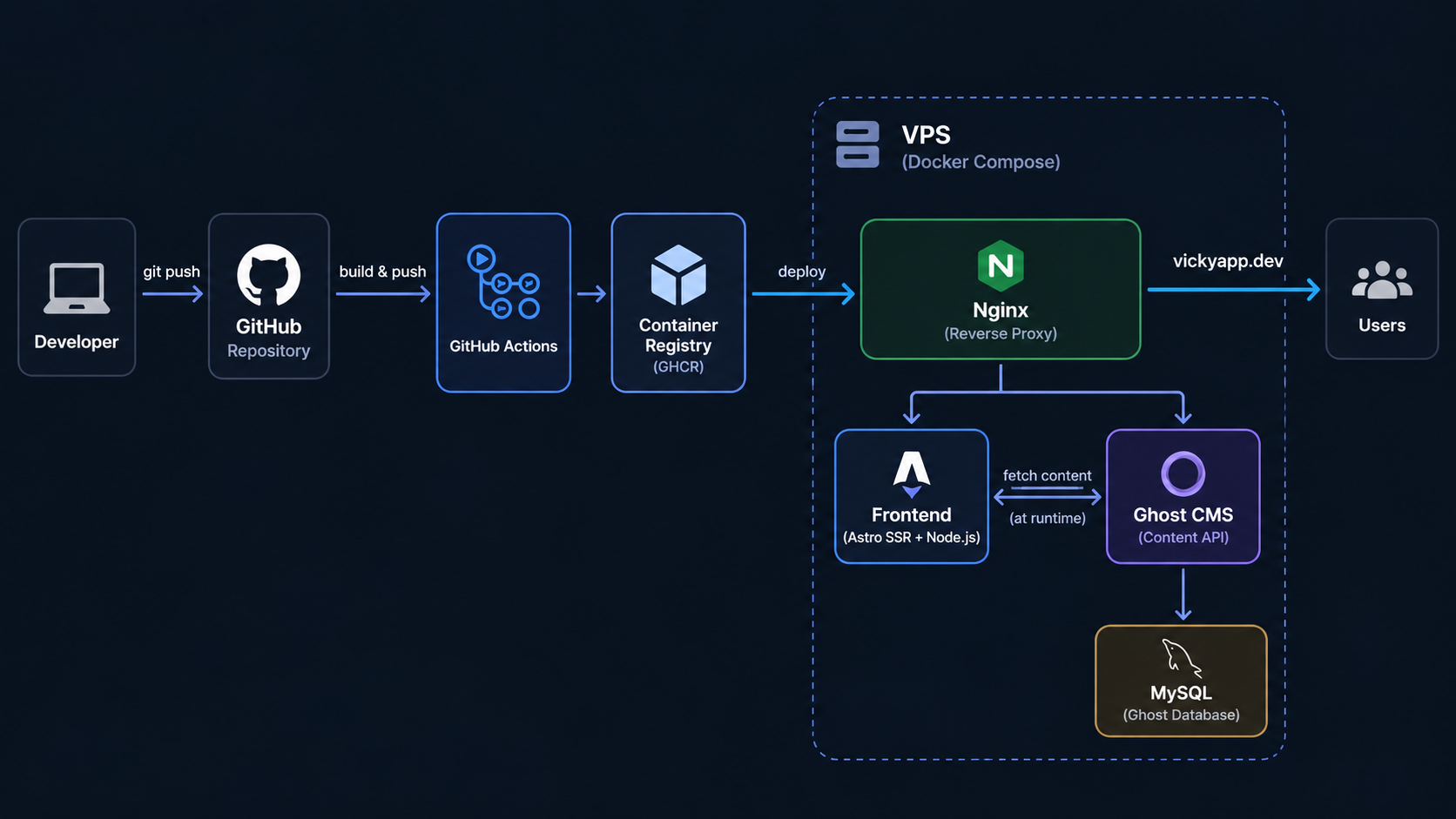
I built my personal website using Astro and Ghost CMS. Astro handles the frontend, while Ghost is where I manage my blog posts. Both run on my own VPS using Docker Compose, with MySQL as the database for Ghost.
Since I already work with Linux servers and containers, I wanted to manage the deployment myself rather than rely on a managed hosting platform.
I use Docker to containerize the application and GitHub Actions to automate the deployment process. Instead of connecting to the VPS through SSH, I installed a self-hosted GitHub Actions runner directly on the server.
The website also uses Astro's hybrid rendering approach. Most of the portfolio pages are statically generated, while blog pages use server-side rendering (SSR) to retrieve content from Ghost.
In this article, I'll go through how I set up Docker, configured GitHub Actions, and got everything running on my VPS.
1. Infrastructure Overview
The website runs on a single VPS with three main services:
- Astro: Handles the frontend using static generation and SSR.
- Ghost CMS: Manages blog content through its Content API.
- MySQL: Stores Ghost's database.
Docker Compose manages the containers, while Nginx on the host handles incoming HTTP requests.
I originally built the entire website using static generation. It worked fine, but I quickly noticed one limitation: every time I published a new article in Ghost, I had to rebuild the frontend for the content to appear.
I eventually moved the blog to SSR while keeping the portfolio pages static.
Now, pages like Home, About, and Work are generated during the build. Blog listings, individual articles, and tag pages fetch content from Ghost when requested.
This way, publishing a new article doesn't require another Docker build or deployment.
The frontend still runs in Docker, but instead of Caddy serving only static files, Node.js runs the Astro application and handles the SSR routes.
2. Dockerizing the Website
I use a multi-stage Dockerfile to separate the build process from the production runtime.
Both stages use Node.js 22 Alpine. The first stage installs dependencies and builds Astro, while the second runs the application with only the dependencies needed in production.
Here's the Dockerfile I use for the frontend:
FROM node:22-alpine AS build

WORKDIR /app

COPY package.json package-lock.json ./
RUN npm ci

COPY . .

ARG SITE_URL=https://vickyapp.dev
ARG CV_URL=""

ENV SITE_URL=$SITE_URL CV_URL=$CV_URL

RUN npm run build
RUN npm prune --omit=dev

FROM node:22-alpine AS runtime

WORKDIR /app

ENV NODE_ENV=production HOST=0.0.0.0 PORT=8080

COPY --from=build --chown=node:node /app/package.json ./package.json
COPY --from=build --chown=node:node /app/node_modules ./node_modules
COPY --from=build --chown=node:node /app/dist ./dist

USER node

EXPOSE 8080

HEALTHCHECK --interval=15s --timeout=5s --start-period=5s --retries=3 \
  CMD node -e "fetch('http://127.0.0.1:8080/healthz').then(r=>process.exit(r.status===200?0:1)).catch(()=>process.exit(1))"

CMD ["node", "dist/server/entry.mjs"]
I use npm ci to install dependencies from the lockfile, which helps keep the build reproducible.
After building the application, npm prune --omit=dev removes development dependencies that aren't needed at runtime.
The final container runs as the built-in node user instead of root and listens on port 8080.
I also added a health check using /healthz so Docker can monitor whether the application server is responding.
Running the Services with Docker Compose
The frontend, Ghost, and MySQL are managed through the same Docker Compose project.
Here's a simplified version of the frontend service:
frontend:
  image: ghcr.io/vicky-ardians/vickyapp-frontend:${IMAGE_TAG:-latest}
  restart: unless-stopped
  environment:
    HOST: 0.0.0.0
    PORT: "8080"
    GHOST_API_URL: ${GHOST_API_URL:-https://${CMS_DOMAIN}}
    GHOST_CONTENT_API_KEY: ${GHOST_CONTENT_API_KEY:?GHOST_CONTENT_API_KEY is required}
    GHOST_API_VERSION: ${GHOST_API_VERSION:-v5.0}
    GHOST_STRICT: "true"
  ports:
    - "127.0.0.1:${FRONTEND_HOST_PORT:-4321}:8080"
  networks:
    - cms
The container listens on port 8080 internally, but the VPS exposes it only on 127.0.0.1:4321.
I chose this because the VPS already has Nginx and other services handling public traffic. There's no reason to expose the Astro container directly to the internet.
Ghost and MySQL use the same Compose network, with persistent volumes for the database and uploaded media.
Another important change after migrating to SSR is how the Ghost API configuration is handled.
The frontend now receives the Ghost Content API URL and key at runtime through Docker Compose. The credentials aren't needed during the Docker image build.
This allows the application to retrieve published content from Ghost without rebuilding the image.
3. Automating Deployment with GitHub Actions
For CI/CD, I use two separate GitHub Actions workflows:
ci.ymlhandles code verification.deploy.ymlbuilds, publishes, and deploys the Docker image.
Both workflows run on a self-hosted GitHub Actions runner installed directly on my VPS.
I chose this setup because the runner can execute Docker commands locally. I don't need to configure an SSH connection from a GitHub-hosted runner just to deploy an application on the same server.
Continuous Integration
The CI workflow runs on every push, pull requests targeting main, and manual triggers.
It checks the application using Astro's verification tools, ESLint, Prettier, and a production build.
I also added checks for the generated HTML, including document structure, language attributes, sitemap entries, and unresolved placeholders.
Since the blog now uses SSR, the workflow includes a separate test suite that exercises SSR routes over HTTP using a local Ghost fixture.
Here's the main part of my CI workflow:
name: CI

on:
  push:
  pull_request:
    branches: [main]
  workflow_dispatch:

concurrency:
  group: ci-${{ github.ref }}
  cancel-in-progress: true

permissions:
  contents: read

defaults:
  run:
    working-directory: frontend

jobs:
  verify:
    name: Verify
    runs-on: self-hosted
    timeout-minutes: 15

    env:
      SITE_URL: https://example.com

    steps:
      - name: Check out
        uses: actions/checkout@v4

      - name: Set up Node
        uses: actions/setup-node@v4
        with:
          node-version-file: .nvmrc
          cache: npm
          cache-dependency-path: frontend/package-lock.json

      - name: Install dependencies
        run: npm ci

      - name: Verify
        run: npm run verify
        env:
          GHOST_STRICT: "false"

      - name: Verify SSR
        run: npm run test:ssr
This is a shortened version of the workflow. The actual file also contains additional checks and uploads the build output as an artifact.
The CI process doesn't need production Ghost credentials. Static build checks run without connecting to the CMS, while the SSR test suite uses an isolated fixture.
Building and Deploying the Docker Image
The deployment workflow runs when I push changes to the main branch or trigger it manually.
It builds the frontend image using Docker Buildx and pushes it to GitHub Container Registry (GHCR).
Each image gets two tags: latest and a tag based on the Git commit SHA.
Here's the main build configuration:
name: Deploy

on:
  push:
    branches: [main]
  workflow_dispatch:

concurrency:
  group: deploy-production
  cancel-in-progress: false

permissions:
  contents: read
  packages: write

defaults:
  run:
    working-directory: frontend

jobs:
  deploy:
    name: Build, push, deploy
    runs-on: self-hosted
    timeout-minutes: 30

    steps:
      - name: Check out
        uses: actions/checkout@v4

      - name: Resolve image reference
        id: image
        run: |
          set -euo pipefail
          owner=$(printf '%s' "$GITHUB_REPOSITORY_OWNER" | tr '[:upper:]' '[:lower:]')
          tag="sha-$(printf '%.7s' "$GITHUB_SHA")"
          echo "tag=${tag}" >> "$GITHUB_OUTPUT"
          echo "image=ghcr.io/${owner}/vickyapp-frontend" >> "$GITHUB_OUTPUT"

      - name: Login to GHCR
        uses: docker/login-action@v3
        with:
          registry: ghcr.io
          username: ${{ github.actor }}
          password: ${{ secrets.GITHUB_TOKEN }}

      - name: Set up Docker Buildx
        uses: docker/setup-buildx-action@v3

      - name: Build and push the image
        uses: docker/build-push-action@v6
        with:
          context: frontend
          file: frontend/Dockerfile
          push: true
          tags: |
            ${{ steps.image.outputs.image }}:${{ steps.image.outputs.tag }}
            ${{ steps.image.outputs.image }}:latest
          build-args: |
            SITE_URL=${{ vars.SITE_URL }}
            CV_URL=${{ vars.CV_URL }}
          cache-from: type=gha
          cache-to: type=gha,mode=max,ignore-error=true
The actual deployment workflow also validates SITE_URL, installs the Compose configuration on the server, updates the frontend container, and checks that the website is responding.
Once the image has been published, the runner uses Docker Compose to update the frontend:
IMAGE_TAG="$IMAGE_TAG" docker compose \
  -f "$DEPLOY_PATH/compose.yaml" up \
  -d --no-deps --pull always --no-build frontend
The --no-deps flag prevents Ghost and MySQL from being restarted during a frontend deployment.
Meanwhile, --no-build ensures the server runs the Docker image already published to GHCR instead of trying to build it locally.
I also use --pull always so Compose retrieves the image associated with the deployment.
Since the runner is installed on the production VPS, the command runs directly on the server without SSH.
4. Content Updates, Health Checks, and Rollbacks
One thing I changed after setting up the initial CI/CD pipeline was how the blog handles content updates.
Initially, Astro generated every page during the build. That meant publishing an article in Ghost required another build before visitors could see it.
I didn't really want to rebuild and redeploy the entire frontend every time I wrote something.
That's why I switched the blog to SSR.
Now, when I publish an article through Ghost, Astro can retrieve the updated content through the Ghost Content API on the next request. The portfolio pages remain static, while the blog works independently of the deployment pipeline.
GitHub Actions is still responsible for deploying code changes, but writing a new article no longer requires a deployment.
Health Checks
After deployment, the GitHub Actions workflow checks whether the frontend container is responding through its /healthz endpoint.
It also sends a request to the public website and expects an HTTP 200 response.
These checks help me narrow down deployment issues. If the container responds locally but the website isn't accessible publicly, I can investigate the reverse proxy, DNS, or TLS configuration instead of immediately assuming something went wrong with Astro.
Rollbacks
I use Git commit SHA tags to keep track of Docker image versions.
If I need to return to an earlier release, I can redeploy a previously published image:
cd /opt/vickyapp/backend

IMAGE_TAG=sha-<previous-commit> \
docker compose up -d \
  --no-deps --pull always --no-build frontend
This runs the previous application version without rebuilding it.
Since Ghost content is now retrieved at runtime, rolling back the application doesn't automatically roll back published articles. The frontend will still request the current content from Ghost.
It's a useful distinction between application releases and content management.
5. Conclusion
Building and deploying my own website has been a good way to put some of the tools I use at work into practice.
Docker Compose keeps the services manageable, and GitHub Actions handles building and deploying the application whenever I push code changes.
Moving the blog to SSR also made publishing articles much simpler. I can write something in Ghost and have it available on the website without going through another Docker build.
There are still things I'd like to improve, especially around CI/CD and how the self-hosted runner is managed. But for now, the setup does what I need, and I've learned quite a bit from building it.